Restaurant POS for dine-in
Tables, captains and kitchen, working as one
For family restaurants, dhabas and fine dining. Captains take orders at the table on Android phones, every station gets its own KOT, and the counter prints the GST bill, even when the internet is down.
- Captain app on Android phones, at the table
- KOTs to the kitchen, tandoor and bar, each with only its own items
- Move and merge tables, split the bill
- Cancelling a sent KOT needs a reason and a manager’s PIN
How it works
An order, from the table to the bill
Take the order at the table
The captain picks the table on an Android phone, adds dishes with half or full portions and notes like “less spicy”, and sends the KOT.
Every station gets its KOT
Rotis to the tandoor, curries to the kitchen, drinks to the bar, on a printer, a kitchen screen or both. The next round sends only the new items.
Bill and free the table
Print the GST bill with CGST and SGST, take cash, card, UPI or a split, and the table is free again.
What you get
What a busy dining hall needs
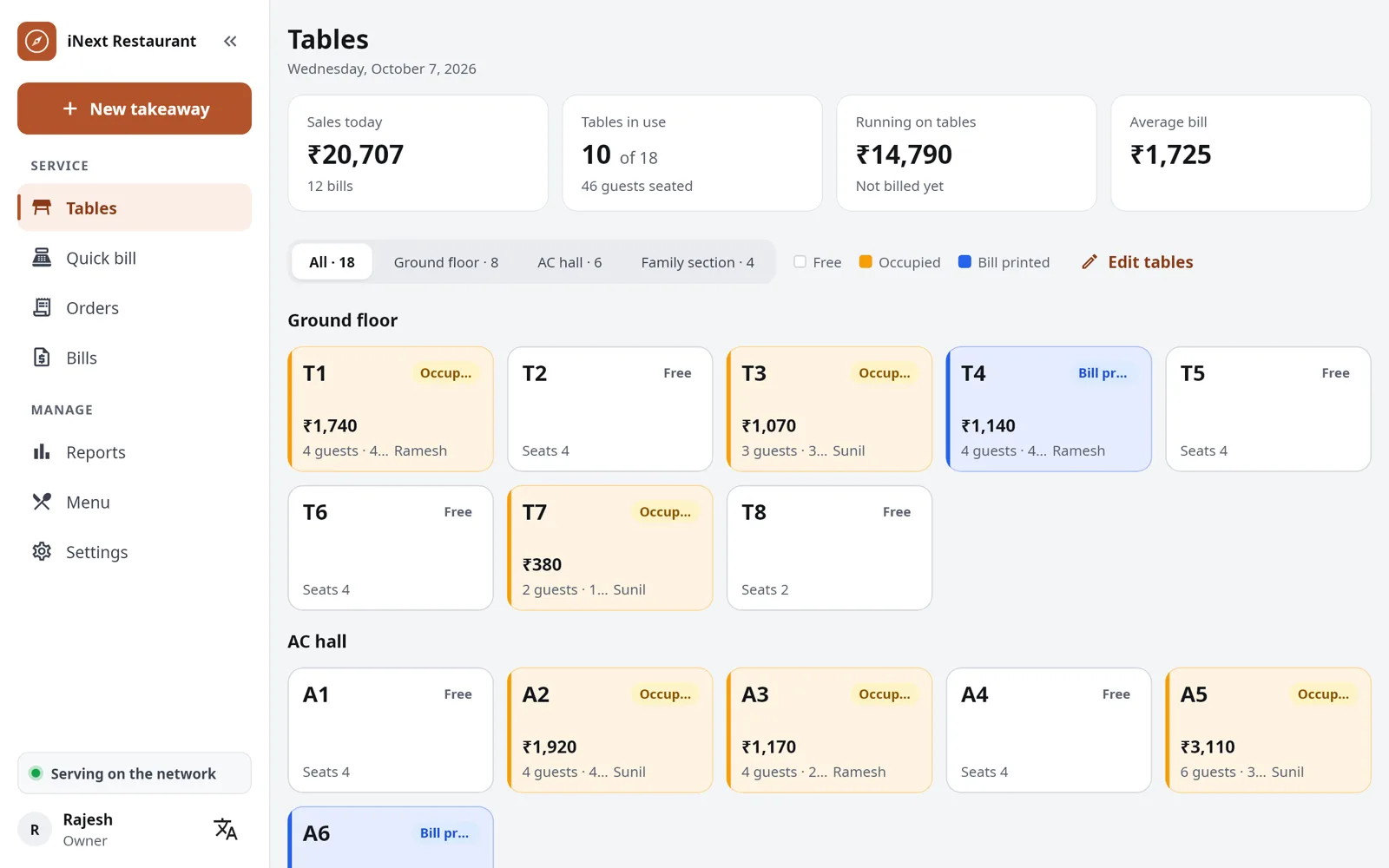
Floor plan by area
AC hall, family section, garden: every table free, occupied or billed, at a glance.
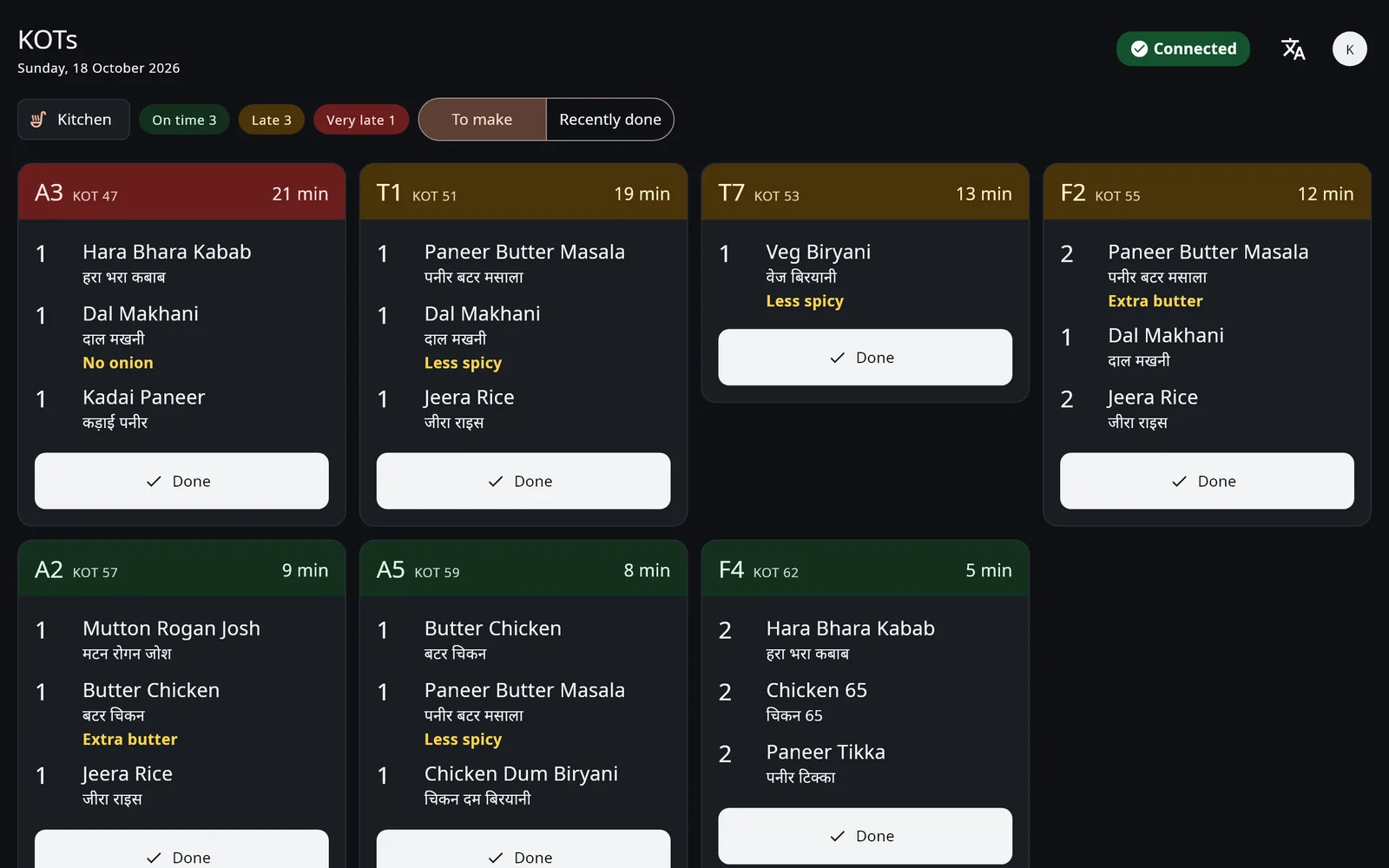
Kitchen screens
Each station sees its KOTs oldest first, with cancellations in red and how long each has waited.
Parcels from the table
Pack part of a table’s order to take away, with a packing charge if you take one.
Service charge and discounts
Add a service charge, give a discount with a reason, and round off to the rupee. A discount above your limit needs a manager’s PIN.
UPI QR on the bill
A bill not paid yet prints a UPI QR for the amount due. Guests pay with any UPI app: no payment gateway, no fee.
KOTs the kitchen can read
KOTs show each dish’s name in your language, and captains find dishes by their English or local names.
Kitchen screen
Every KOT in front of the cook, oldest first
Put a tablet or a screen at any station, instead of a printer or next to one.
- One screen for each station: kitchen, tandoor or bar
- Notes like “no onion” stand out in colour
- Late KOTs turn amber, very late ones red
- Done with one tap, and the last one can be recalled
The plan that fits
Restaurant
₹6,999 a year for each outlet
Tables and captains, KOTs to every station, kitchen screens, GST bills, twelve reports and your sales on your phone. Also bill takeaway at a counter? Full (Restaurant + Counter) is ₹9,999 a year.
Every feature of the plan is included. Start with a 30-day free trial on your own PC or tablet.
Questions from restaurant owners
Do the captains’ phones need the internet?
No. They talk to the main counter over your restaurant’s own Wi-Fi. If a phone cannot reach the counter, it says so, and the captain sends the order again once the phone is back on the Wi-Fi.
Can the tandoor and the bar get separate KOTs?
Yes. Each menu category goes to a station, such as kitchen, tandoor or bar, and each station gets only its own items, on its printer, its screen or both.
Can a table’s bill be split?
Yes. Split the bill, move the table or merge two tables’ orders from the counter.
How do I stop changes to an order the kitchen already has?
A sent KOT is never edited or deleted. Cancelling an item needs a reason and a manager’s PIN; the kitchen gets a cancel KOT, and it shows in the cancellations report.
We also bill takeaway at a counter. Which plan?
Full (Restaurant + Counter), ₹9,999 a year: tables and captains, plus quick bills with token numbers at the counter.
Also made for
See it at your own counter
Tell us about your outlet and we will show you a bill, a KOT and the day-end report.