Restaurant POS features
Everything a restaurant counter needs
Tables, KOTs, captains, kitchen screens, GST bills and reports, on your own PC or tablet, with or without the internet.
- Billing that never needs the internet
- Staff can’t quietly change a bill: every cancellation needs a reason and a manager’s PIN
- In eight languages: English, Marathi, Hindi, Gujarati, Tamil, Telugu, Kannada and Bengali
- From ₹4,999 a year, everything in the plan included
Tables and KOTs
Open a table, add items and send the KOT. Each send prints only the new items, to the right station: kitchen, tandoor or bar. Move and merge tables, and split the bill.
Captain app
Captains (waiters) take orders at the table on Android phones. The order reaches the counter and the kitchen straight away.
Kitchen screen
Each station gets its KOTs on a printer, on a kitchen display screen, or both. New tickets oldest first, cancellations in red, and the time each has waited.
Quick service
For counters: the bill, the KOT and a token number in one step. Type “2 chai” and press Enter to add two.
GST billing
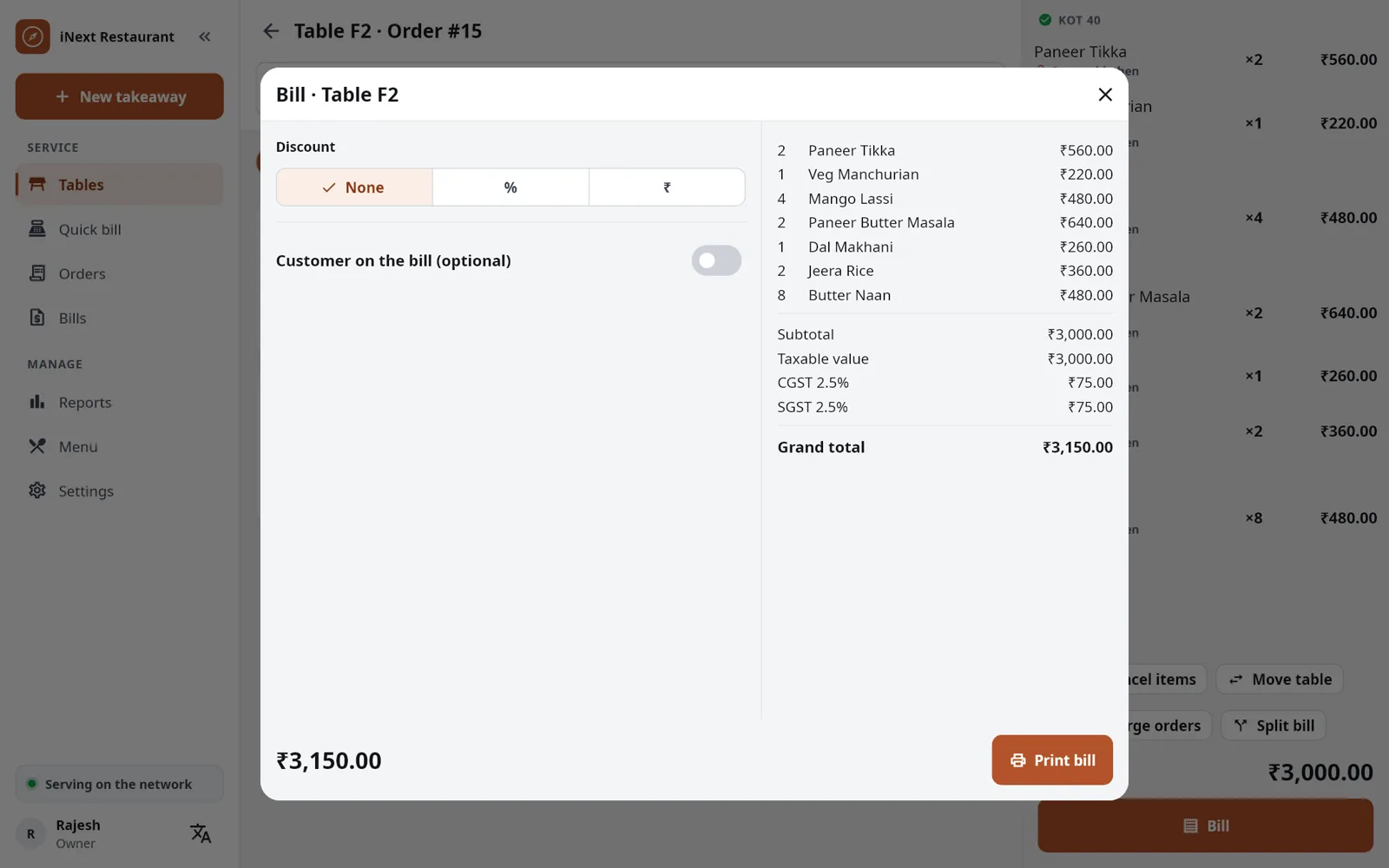
Regular GST with CGST and SGST, composition with a bill of supply, or no GST. Discounts, service charge and round-off.
Every way to pay
Cash, card and UPI, split between them, or on credit for regular customers.
Works without internet
Everything runs on your outlet’s own network. When the internet goes down, billing does not.
No quiet changes
A KOT that has been sent is never edited. Cancelling needs a reason and a manager’s PIN, and goes in the audit log. A reprint says DUPLICATE.
Reports and day end
Twelve reports, from daily sales to tax, cancellations and credit due, in Excel or PDF. Close the day with a cash count.
Expenses
Note what was paid out of the cash drawer, so the day-end cash adds up.
Backups
An automatic backup every day, a backup to a USB drive when you want one, and an optional copy on Google Drive.
In your language
English, Marathi, Hindi, Gujarati, Tamil, Telugu, Kannada and Bengali on every screen, chosen on each device. KOTs show each dish’s name in your language for the kitchen.
Now serving on a TV
A counter can show the ready token numbers on a TV or a spare phone, in any browser on the outlet’s Wi-Fi.
Your menu in Excel
Export the menu to Excel, change the prices there and import it back, or bring a ready menu to a new outlet.
Updates in one tap
The app tells you when a new version is ready. Phones and tablets update to the same version as the main counter.
New in version 1.3
More of your business, on the same counter
Bar billing
An add-on for bars and permit rooms. Drinks get their state VAT, food keeps its GST, on one bill or a food bill and a bar bill paid together. Drinks go to the bar as a BOT, and dry days stop drinks by themselves.
Stock and recipes
Vendors, purchases and what you owe them, stock counts and wastage, and recipes with the cost of each plate from your latest prices. Drinks are counted in bottles and ml. Switch it on when you want it.
Online orders
Swiggy and Zomato orders typed in at the counter, with the platform’s order number and its own prices, and reports for each platform.
Sold by weight
Sweets, farsan or cakes by the kilo: type the weight and the price follows, on the bill and in the reports.
Bills that look right
Your name, header and footer in clear letters, in three sizes. Choose what prints by itself for each kind of order: the kitchen ticket, the bill, or both.
Customers and statements
A customer’s name and phone on quick bills, and a monthly account statement for credit customers, in PDF or Excel.
Extras with prices
Extra cheese, butter or an egg on a dish, at their own price, shown to the kitchen with the dish.
Touch-screen keyboard
A keyboard of its own on touch-screen PCs, with a number pad where you type amounts.
New in version 1.2
For the owner and your guests
Your shop on your phone
Sales so far, how customers paid, busy hours and top items, updated through the day. Cancellations, discounts and reprints, with who did them.
All outlets on one phone
Link your phone at each outlet’s billing PC and see every outlet’s sales today side by side, or open one.
QR menu
Guests scan a code on the table and see your menu, prices and what is sold out, with names in your language. View only.
UPI QR on the bill
Bills not paid yet print a UPI QR for the amount due. Guests pay with any UPI app: no payment gateway, no fee.
Packing charge
A charge per parcel order or per parcel item, on its own line of the bill, with the GST of the food.
Complimentary bills
A staff meal or a guest of the house goes on a bill at no charge, with a reason and a manager’s PIN, and shows in the day-end.
Billing
GST bills your accountant will like
- CGST and SGST worked out for each rate, with HSN/SAC codes
- Bill numbers that run in order for the financial year, with your outlet’s prefix
- Prices with or without tax, as you set them
- A UPI QR for the amount due on bills not paid yet
- Packing charge for parcels, on its own line
- Thermal printers on LAN, USB or Bluetooth, 58 mm or 80 mm
- A failed print never loses a bill: it is saved first and printed again when the printer is back
Devices
Runs on what you have
The main counter
A Windows PC or an Android tablet. It holds the outlet’s data and does the billing.
Captains
Android phones, on the outlet’s Wi-Fi. They find the counter by themselves, or pair with a QR code.
Kitchen
A thermal printer, a screen, or both, for each station.
Printers
Thermal printers on the network, on USB (Windows) or on Bluetooth (Android). An office printer prints the reports as PDF.
The full list
Every feature, at a glance
Tables and orders
- Tables by area: free, occupied or billed at a glance
- Move a table, merge orders, split the bill
- Half and full portions, notes for the kitchen
- Search by name, in English or your language
- Parcel items on a table order
- Sold out for the day, on every device
- Running orders: dine-in, parcel and tokens
- Extras with prices, like cheese or an egg
- Items sold by weight, priced per kg
- Swiggy and Zomato orders typed in, with their own prices
Kitchen
- KOTs to each station: kitchen, tandoor, bar
- Each station on a printer, a screen or both
- Kitchen screen: oldest first, cancellations in red
- Mark a KOT done, recall the last one
- Dish names on KOTs in your language
- A fallback printer for each station
- Choose what prints by itself for each kind of order
- Drinks to the bar as a BOT
Billing and GST
- CGST and SGST with HSN/SAC codes
- Composition bill of supply, or no GST
- Prices with or without tax
- Discount, service charge and round-off
- Packing charge and complimentary bills
- Bill numbers in order for each financial year
- 58 mm and 80 mm bills; reprints say DUPLICATE
- Your name, header and footer in clear letters, in three sizes
- Bar billing add-on: drinks with state VAT, one bill or two
Payments
- Cash with change
- Card and UPI
- UPI QR on the bill for the amount due
- Split between cash, card and UPI
- Credit for regular customers, with their account
- Monthly account statements, in PDF or Excel
Counter service
- Bill, KOT and token number in one step
- Token numbers that start again every day
- Now serving on a TV or a spare phone
- Extra counters on other PCs or tablets
Staff and control
- Own 4-digit PIN for each person
- Owner, manager, cashier, captain and kitchen roles
- Manager’s PIN to cancel items or bills
- Manager’s PIN for discounts above your limit
- Audit log of cancellations, discounts and reprints
- Day-end with a cash count
- Expenses paid from the cash drawer
Reports
- Daily sales, items and categories
- Captains and payment modes
- Tax (GST)
- Cancellations, discounts and complimentary
- Credit due, expenses and day-end
- Online orders by platform
- Food and drinks apart, for bars
- Excel and PDF export
Stock and recipes
- Vendors, purchases and what you owe
- Stock counts and wastage
- What to order, before you run out
- Recipes with the cost of each plate
- Drinks counted in bottles and ml
- In every plan, switched on when you want it
Data and updates
- Works on your own network, without internet
- Automatic backup every day
- Backup to USB or Google Drive
- Restore that checks the backup first
- Updates in one tap, backed up first
- Licence works offline
Owner and guests
- Sales on your phone every 20 minutes
- All your outlets on one phone
- QR menu with what is sold out
- Menu export and import in Excel
- Eight languages: English, Marathi, Hindi, Gujarati, Tamil, Telugu, Kannada and Bengali
See it at your own counter
Tell us about your outlet and we will show you a bill, a KOT and the day-end report.